Callmaker logo

Features

Everything you need for outbound and inbound calls, meeting booking, automation and follow-up – in one cloud platform, with AI built into the whole flow.

Our dialer is a complete Contact Centre as a Service with the features you want.

read about the latest features here:

Outbound
Call with predictive, preview, auto or click to dial depending on your needs. A pacer that tunes itself, AI answering machine detection and smart caller ID choice.
Inbound
Inbound queues with an IVR menu, opening hours and call forwarding – and callblending that slots returning leads in between outbound calls.
Meeting booking
Book meetings online or on site in every sales rep's calendar side by side. Two-way sync with Google and Microsoft 365, confirmations, reminders and meeting outcomes.
Autopilot
Automate processes and sit back. Build flows yourself, start from a template or describe what you want to the AI – and connect Callmaker with other systems.
E-sign
E-sign with SMS to get written acceptance in consumer sales. The customer replies YES, the order is approved and a certificate is created automatically.
Dashboard
Dashboards with statistics, charts and a user monitor, and TV screens in the office with goals and top lists – for a full overview of your operation.
Integrations
Connect Callmaker to Google and Microsoft 365 calendars, email, FTP and your own systems – without code using Autopilot or through thousands of apps on Zapier.
API
A REST API with OAuth 2 for customer cards, orders, bookings, calls and statistics – and events sent to your system in real time.
TV screen
Show goals, top lists, competitions and today's numbers on the office TV – with highlights and sound when goals are reached.

Personal number

Show only your own number – if you want to

1-click campaign

As easy as it sounds. You’re up and running straight away.

Personal inbound

Receive calls on your personal number

Manage leads

Easy import, do-not-call lists and duplicate washing

Powerful search

Search customer cards, calls, orders and bookings

Magic button

Link buttons to URLs with templates

Automatic settings

All settings are inherited unless you decide otherwise. 

User management

Drag and drop at its best

Listen in

Listen in and whisper in real time, or listen afterwards

Coaching

Rate calls and use call search to find them

Customer card editor

You have full control over the layout of your different customer cards

Quality assurance

Search, listen, approve, rate, send back

AI across the platform

AI that makes the job easier for both sales reps and administrators – built in where it helps.

Transcription and summaries

Calls are transcribed with a Swedish-trained AI model, anonymised if you like and summarised automatically.

AI coaching and order validation

Coaching notes with strengths and improvements per call, and orders reviewed against the call recording.

Answering machines and noise

AI that recognises answering machines before the call is connected, and AI noise reduction that filters out background voices.

Build with AI

Describe an autopilot or a customer card layout in plain language, and the AI builds it for you.

CM assistant

A chat assistant for administrators that answers questions about Callmaker based on the product documentation.

Skill-based outbound routing

The call goes to the sales rep with the best chance of succeeding with that particular customer, with proven effect before it's switched on.

Coach, follow up and motivate

The tools for leading your sales reps are in the same platform they call from.

  • Agent profile with results, ratings, coaching and goals for every sales rep
  • Screen recording with markers for every call, and remote support when the sales rep asks for it
  • Chat between sales reps and team leads, and messages to whole groups
  • Goals and competitions with winners, badges and streaks
  • Mobile view for administrators: the floor, lists, statistics and listening in on your phone

Listening in

Listen in and whisper to the sales rep without the customer hearing

Call search

Find calls by outcome, length and rating

Reviews

Rate calls, orders and bookings

Timeline

Replay the sales rep's day with every call

Administration that keeps things in order

Permissions

Your own permission sets and a limited administrator role, so everyone sees exactly what they should.

Organisation groups

Put users in groups on top of projects and campaigns, so several subcontractors can work in the same campaign without seeing each other's data.

Invite users

Invite new users by email or import them from a file, and let them reset their own password.

Checks and rules

Rules checked before an order, booking or outcome is saved – required fields, formats and booking times.

Do-not-call lists and duplicates

Wash lists against your own do-not-call lists and find duplicates by phone, organisation or personal identity number.

GDPR and data deletion

Delete customer cards, lists, bookings and recordings automatically after the time you decide.
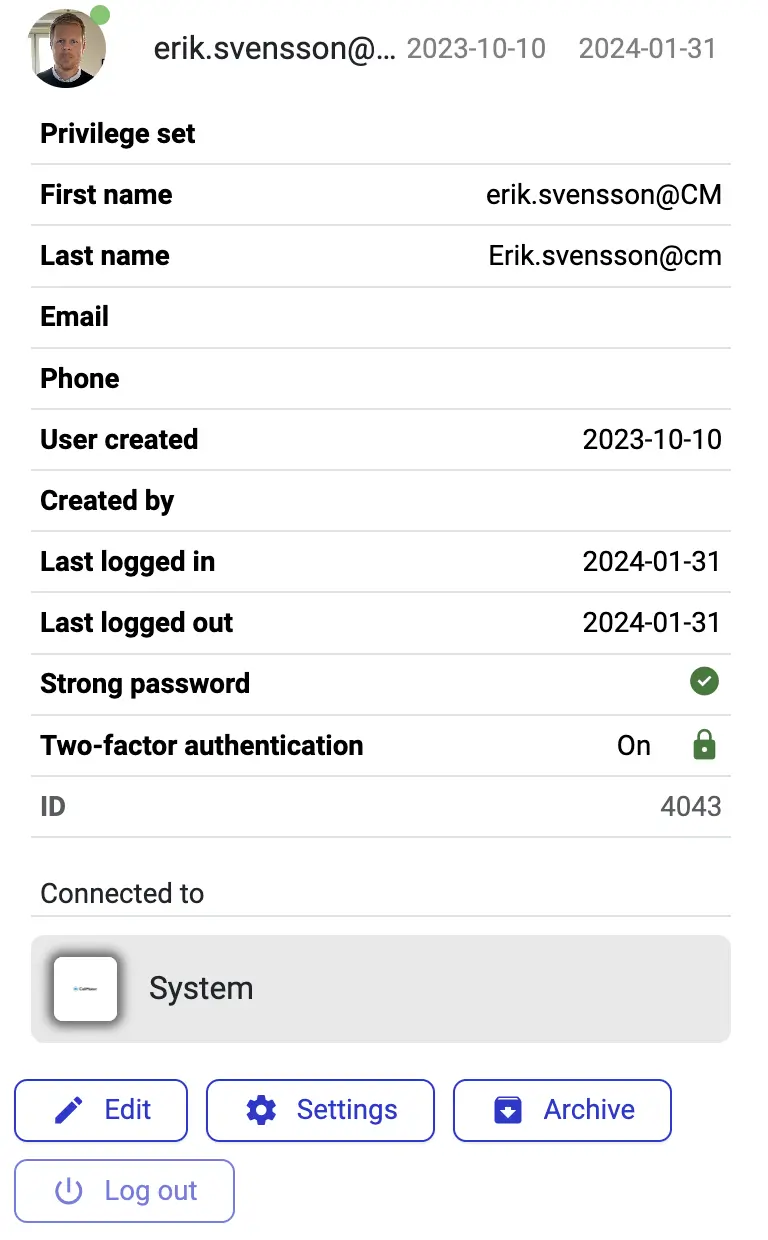
Security

We work according to the ISO 27001 guidelines, and every year the system undergoes a test in which an external party audits its security and tries to hack it – a so-called penetration test. To minimise the risk of account takeover, you can enable 2FA on your account or set a policy requiring all users to have 2FA enabled. All communication in the system, including telephony, is of course encrypted to the highest level.
Security settings for users in Callmaker

Frequently asked questions about Callmaker's features

What's included in Callmaker?

A complete platform for outbound and inbound calls: dialer, inbound with an IVR menu, meeting booking, Autopilot, e-signing via SMS, dashboards, integrations and an API, with AI built into the whole flow. Some parts, such as inbound and TV screens, are included in larger plans or available as add-ons.

Do we need to install anything?

No. Callmaker runs in the browser, and sales reps call with the built-in web phone. All you need is a computer and a headset.

Does Callmaker work on mobile?

Administrators and team leads have a mobile view in their phone's browser, with the floor live, lists, statistics, chat and listening in. Sales reps call from their computer.

Can Callmaker be connected to our other systems?

Yes. Google and Microsoft 365 calendars, email and FTP are connected directly in Callmaker, you build your own integrations without code with Autopilot, and developers have a REST API. Through Zapier you also reach thousands of apps.

How are our accounts and data protected?

You can require two-factor authentication for all users, control exactly what each user can see with permission sets and organisation groups, and delete data automatically according to your GDPR routines. The system is also security-tested by an external party every year.

Where can I see what's new?

In our changelog, where we describe the news in every version of Callmaker.

How do we get started?

Book a demo and we’ll go through the system together. It usually takes a few hours from becoming a customer until you can start taking calls in the system.

CM Software Callmaker AB © 2026. Callmaker™ is a registered trademark of CM Software Callmaker AB.

CM Software Callmaker AB
556999-9971
Stora Badhusgatan 18
411 21 Göteborg
Sweden