
CallMaker is featured on Företagande.se
Företagande.se has published an article about CallMaker’s journey—from its early years in a basement to today’s cloud-based dialer…

New update
Release notes CallMaker 1.43 2025-06-02
Further improved DNC / Barring function
Personal queue
Autopilot functions
Admin can trigger autopilots via buttons on Search
Agent can trigger autopilots via button on customer card
External APIs + Internal Autopilots = True ♥
Easier handling of Telesvar in PD
AI module that recognizes telesvar, telia customer messages etc and filters out those calls
Extended access for administrators to field orders, templates, searches,
layouts etc
Booking calendar on agent dashboard
Resly sync for e-signing with BankID
Mail templates and standalone mail
Use of files in Callmaker
iframes
Improvements to CallerID handling
The filter in 'Search booking' now supports Attendees/Guests
Done for now
_______________________________________________________________________________________________
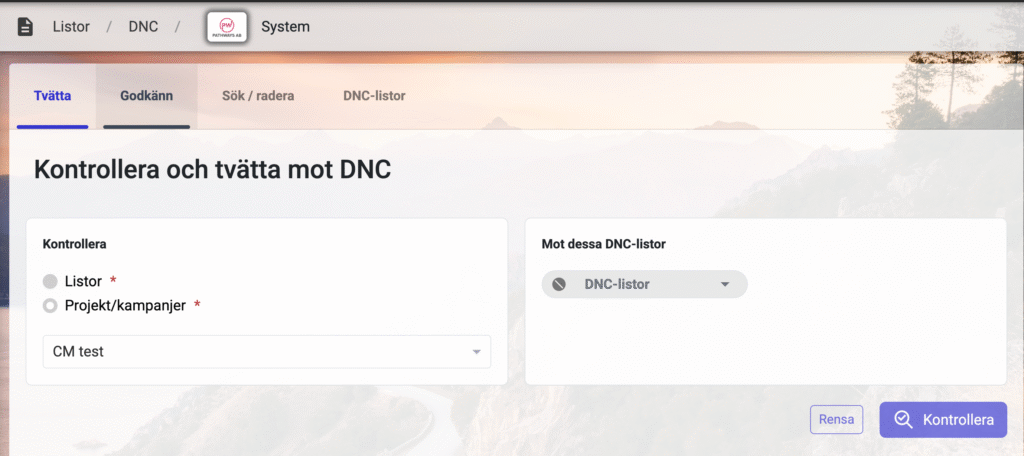
Further improved DNC / Barring function:
Now you can easily upload a list of numbers directly to the barring list.
You can also replace the entire content of the list with a new one if you work that way, which
makes it easier to connect a barring list to an Autopilot.
It is also easy to add single numbers to the barring list now.
Just remember to run a barring wash afterwards so the material already entered
is washed!
_______________________________________________________________________________________________
Personal queue
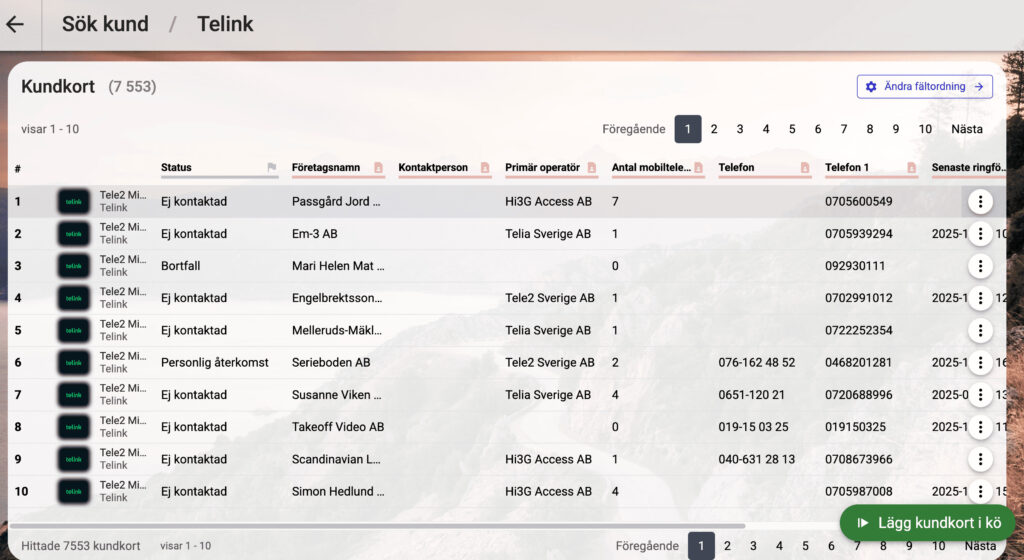
As an agent, you can now queue up a requested batch of customer cards to process
these without the usual randomization of all available material.
Think of it this way, you are a company that contacts individuals about digging for
fiber. So you set your agent, Lisa, to contact everyone on a particular street.
Instead of an admin having to sort this out and upload a special
list that might go into a special campaign for Lisa to call these
numbers, Lisa can now go into search customer cards, type in the city and street to get
all the relevant customer cards, and then click the new "Add to
personal queue" button.
Once the numbers are added, the agent gets a new view where they can see their queue and also
change the order in which the customer cards come in, do you want to process by street number?
Click on the field title to change the sorting!
From the same view you can empty your queue, and initiate the processing of it!
The function is automatically activated, but you can easily turn it off via
"Settings->System settings", you will find the function at the bottom.
Here you can also adjust how many customer cards the agents should be able to put in their
own queue.
_______________________________________________________________________________________________
Autopilot functions
● Admin can trigger autopilots via buttons on Search
In this update, we now have the ability to run autopilots via a button
you can get to the Search functions.
For example, you could have a button on search customer card that takes the customer card
and puts it in a user's personal queue, and notifies the user that they
have received a hot new lead to be called ASAP.
Or maybe something more complicated?
You could have a button on Order Search that with a single click sends a
SMS to the customer, adds the order to a new order status, initiates an api call out to another
external system with customer information, and then automatically exports
the audio files to an SFTP server.
As the old saying goes "The sky's the limit".
● Agent can trigger autopilots via button on customer card
This works similar to the above function but it triggers when an agent
clicks a new type of button on the customer card.
You could have an autopilot connected to the button that gives you 5 different
options, each option has its own mail template, you could have a button
with a quote, one with a price list for different services, etc.
Or something more advanced, a button that sends customer card info to an external
system that checks if the person is already in a customer list and returns a
customer ID, or other interesting information directly to the customer card.
_______________________________________________________________________________________________
External APIs + Internal Autopilots = True ♥
There are now new advanced features for our powerful Autopilot system.
You can now add steps and even triggers that connect external APIs
with the internal Autopilots. You may have an Autopilot that triggers on orders
and sends out information to an external system.
Or perhaps Autopilots that are triggered by receiving a call from outside,
webhooks, which asks for info or comes with info.
Perhaps in collaboration with a function you can read more about later, when someone signs
a document in an external system, such as Resly.
Calls from outside are secured with auth and hmac signature if desired.
Much of this has already gone with pure API but it is now less dependent on
pure API builds, much can be solved directly in Callmaker's UI.
_______________________________________________________________________________________________
Easier handling of telephone responses in PD
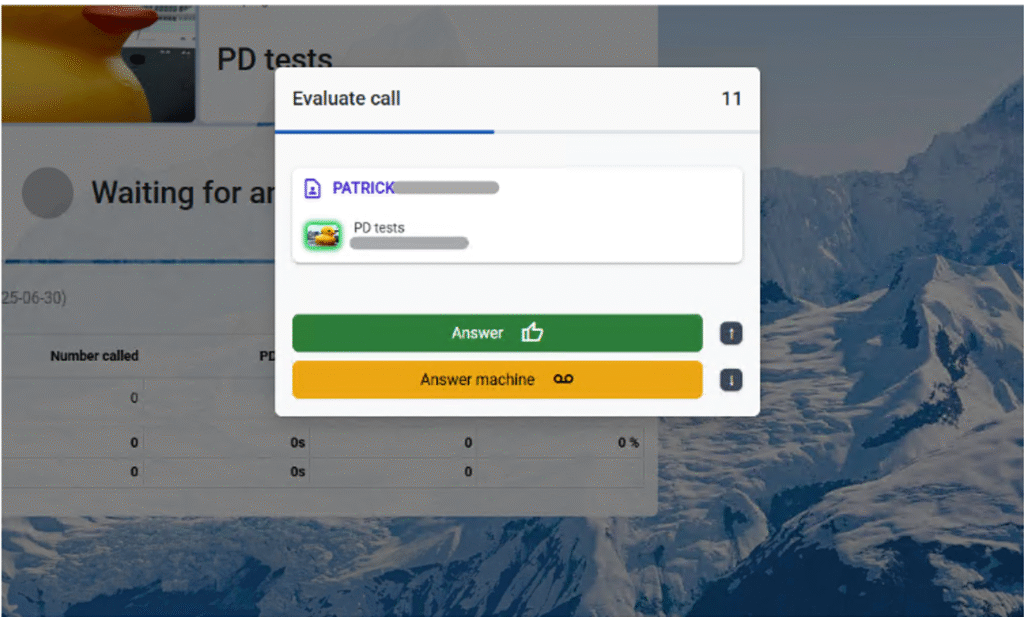
Many people who run PD, Predictive dialing, have probably noticed the new
dialog box that pops up with each response. The purpose is to allow agents to easily and
quickly sort out those boring answering machines that the agents
need to sort out. Now the agents can do it directly on the PD waiting page, without
having to wait for the customer card to pop up or having to go down to the button to
put voicemail and then back out to PD waiting.
Now the agent can quickly determine if it is Voicemail, just clicking away, or
the down arrow on the keyboard.
Or if it is a real call, approve, or the up arrow on the keyboard.
As long as you have mapped which field(s) are the Name fields, you already see in the
evaluation box who you are talking to.
The function is turned on by default but you can always turn it off under
"Settings->Dialing", it is called 'Answering machine dialog in Predictive'
_______________________________________________________________________________________________
AI module
... that recognizes voicemails, telia
customer messages etc and filters out the
calls
We now have an exciting new premium feature that the developers built for those who
run the dialing types Predictive or Preview.
It works so that we let an AI analyze all calls before they are sent to
Agent. If the call is interpreted as an answering machine, it is put as that and a new
call is found for the agent, without the agent having to lift a finger.
There is a choice of whether the agent should be able to hear the call or not during
the analysis and pick it up on their own or whether it should be completely
left to the AI.
Check with your salesperson with us to see if this is something for you!
_______________________________________________________________________________________________
Extended access for administrators to
field orders, templates, searches,
layouts etc.
Now regular admin accounts have access to several features that were previously only
available to us at Callmaker. Functions such as creating Project fields,
product fields etc.
There is now access to creating custom searches that can be applied to search
components on customer cards or dashboards etc
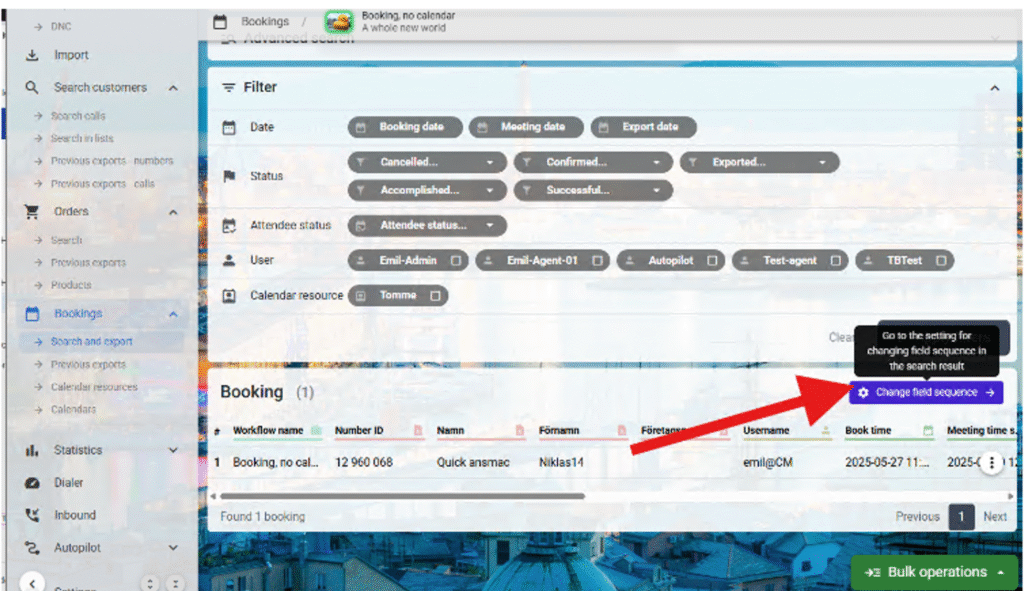
There has also been created a little smoother access to e.g. Field order for search booking:
These buttons at the search result on, among other things, 'Search Bookings' take one to the page
where you edit which fields should be visible in the search result.
_______________________________________________________________________________________________
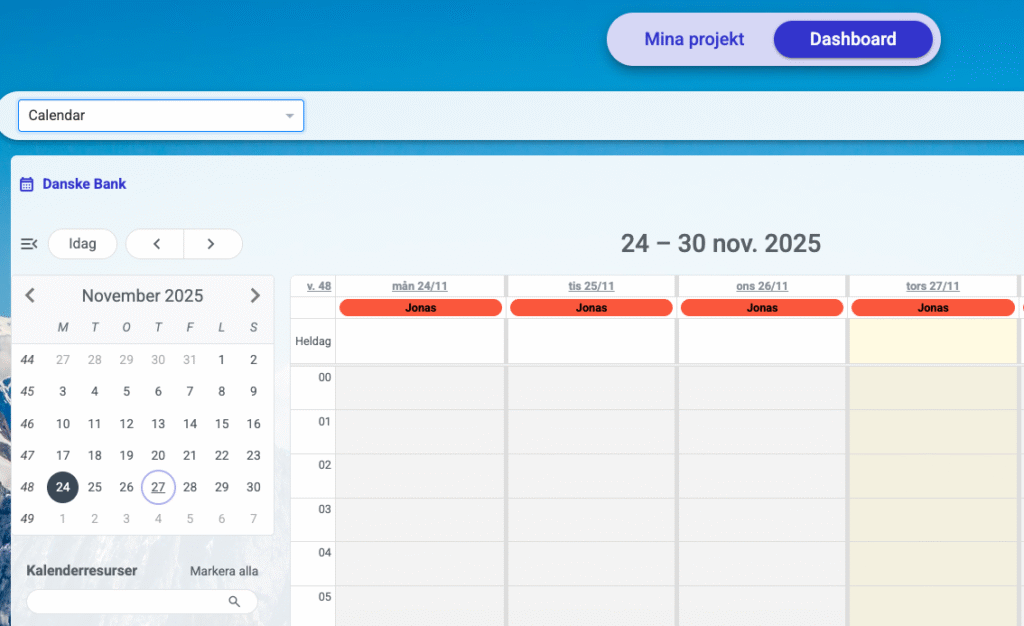
Booking calendar on the agent's dashboard
There is now a new component that can be posted on the agents' dashboard that
shows the booking calendar without having to enter a customer card to be able to
check it.
Resly sync for e-signing with BankID
We have now started a collaboration with Resly, www.resly.se, to be able to create
invitations to sign agreements with BankID, below is an example we can
send by Mail.
When you click on 'Review and sign' you get a document, where
you can sign with BankID. The document template is uploaded directly to the callmaker
and connected with the autopilot that handles mailing.
When the customer signs with BankID, we can receive that information with a
different autopilot that triggers when Resly's API calls us.
_______________________________________________________________________________________________
Mail templates and stand-alone mail
You can now use autopilots to send stand-alone mail (without orders/bookings), these can
be very simple with pure unformatted text, or more advanced with HTML
code.
You can create several templates and with the help of the autopilot system set up
buttons or triggers that send these mails. These templates can be made directly in
Callmaker and are independent of the ready-made mail templates you usually
use via Brevo, which is the mail system we use.
Use of files in Callmaker
The file management in Callmaker has been expanded.
You can now upload files that can be used in eg.e.g. Resly as an agreement.
You can now also attach files to emails sent via autopilots, these emailed files
can be either files uploaded to Callmaker, or files generated in
Callmaker e.g. from order exports or Esign verifications.
_______________________________________________________________________________________________
iframes
We have a new component for the customer card that works a bit like a miniature
browser in the customer card. The function works a bit like the fields we had that
opens a web page, often for an automatic search for phone number or
address. But instead, the iframe component opens that page in a box on the
customer card.
This can be a convenient way to get information in a box from an external
system, for example for order placement in a portal.
Or why not a way to smoothly reflect a daily agenda or a script
that you can adjust, e.g. like this:
Note! Unfortunately, google is not so happy in iframes so you can not use their pages, we are working
on possible ways to solve this.
_______________________________________________________________________________________________
Improvements to the CallerID handling
Some of you have already noticed that the old CallerID handling is now not
possible to use, 'Displayed numbers' under "Settings->Dialing", this was not good
and was really just a placeholder until we made a better one.
And now we have it. Since Christmas the new CallerID page has been implemented but we
left the old one active, until now.
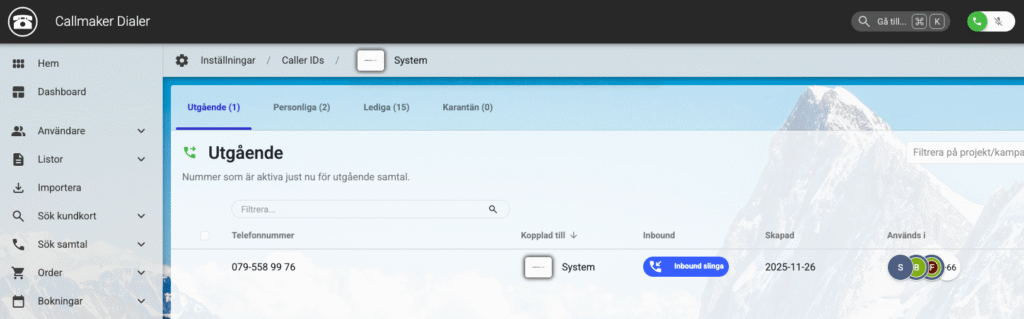
So to switch numbers on and off you now go to "Settings->CallerIDs
What's new this time is:
● You can now filter down to project or campaign level, will be a little smoother
for those of you with many projects and campaigns that all have different numbers.
You can now also choose to replace numbers straight away.
Select a number in the list of linked numbers and click 'Replace
number', select a new number to replace it and it's done!
There is also an option to send the replaced number to quarantine directly
when replacing.
Available for both replacing individual numbers and via bulk.
_______________________________________________________________________________________________
The filter in 'Search booking' now supports
Attendees/Guests
The filter for Search Bookings now has a new support for the function Guests (also often called
Attendees). You can now, as an example, filter out all bookings where no one has
accepted. You may want to do a sweep of all tomorrow's bookings and see
if one or more have accepted, and if not maybe call them up and check
that they have not forgotten or are actually still interested!
Done for this time
Remember that you are warmly welcome to leave suggestions and ideas and of course
feedback on existing features. We cannot promise that everything will be implemented or
when it would happen, unfortunately we are as bound to time and space as everyone else.
But we are always interested in how you who are in the system and working would like
to see the system working.
Best regards: the team behind CallMaker Dialer.